Google Chrome logo Custom Browser Extensions · Manifest V3

Chrome Extension Development in Udaipur.

Our Chrome Extension Development Services in Udaipur, Rajasthan help you automate internal operations, launch SaaS companion extensions, and build custom Manifest V3 browser workflows straight into your stack.

Reviewed on Google
★★★★★ 4.9 · 50+ Reviews
Engineered for Web Store
★★★★★ Manifest V3
Verified on Clutch & B2B
★★★★★ 350+ Builds
Fintech Popup
Wallet & Spend Tracker — Chrome extension and app UI inspiration
Wallet & Spend Tracker
Manifest V3 · Featured
DappBack Extension Popup — Chrome extension and app UI inspiration
DappBack Extension Popup
UI Components
LaunchKit Dark Panel — Chrome extension and app UI inspiration
LaunchKit Dark Panel
Built for Every Major Browser & Store
Google Chrome Google Chrome
Microsoft Edge Microsoft Edge
Mozilla Firefox Mozilla Firefox
Apple Safari Apple Safari
Opera Opera
Brave Brave
Vivaldi Vivaldi

Trusted by growing brands

Chrome Extension Development Company in Udaipur

Turn 12 manual browser steps
into one in-page action.

Your team and customers already work inside Google Chrome, Microsoft Edge, CRMs, and AI tools. As a leading Chrome Extension Development Company in Udaipur, Rajasthan, IPrix Media delivers Chrome Extension Development Services and Custom Chrome Extension Development that embed your workflow directly into the active browser tab.

We integrate inside: Google Chrome logo Google Chrome Microsoft Edge logo Microsoft Edge OpenAI / ChatGPT logo OpenAI / ChatGPT Claude AI logo Claude AI Google Gemini logo Google Gemini HubSpot CRM logo HubSpot CRM Shopify logo Shopify Notion logo Notion
📍 Udaipur, Rajasthan · Hiran Magri Manifest V3 Experts

Hire Chrome Extension Developers in Udaipur for Custom Browser Plugins

Partner with our in-house engineering team in Udaipur for Browser Plugin Development Services, AI-Powered Chrome Extension Development, and Manifest V3 Migration Services.

Chrome Extension Development Services Chrome Extension Company Udaipur Custom Chrome Extension Development Manifest V3 Migration Services AI & CRM Browser Extensions Hire Chrome Extension Developers Udaipur
How teams execute repeatable browser tasks Same daily workflow, two ways to run it
Before Chrome In 6 disconnected tabs
Google google.com/search?q=prospect+crm+catalog
1. Open prospect webpage & copy fields
Tab 1 opened
2. Switch to CRM & search duplicate record
Tab 2 opened
3. Paste into ChatGPT to draft summary
Tab 3 opened
4. Format SKU & pricing in Google Sheets
Tab 4 opened
5. Manually fill 18 supplier form inputs
Tab 5 opened

A maze of open tabs. Employees switch between 5+ web apps, copy and paste data by hand, and lose hours to repetitive context switching.

Now Chrome In your Chrome Extension
Chrome IPrix Manifest V3 Side Panel
● Active on tab
DOM Context Extracted Captures structured fields from active tab
✓ Auto-read
AI Copilot & Rule Check Enriches record via OpenAI / Claude API
✓ AI verified
CRM & Store Synced Pushes to HubSpot, Shopify, or ERP API
✓ 1-click sync
Run complete workflow on current page Alt + Shift + E

One in-page browser overlay. The extension reads page context, runs your AI or API logic, and completes the action without leaving the tab.

12m Manual
90s Extension
82% faster task
completion

across repeatable CRM, catalog listing, and support workflows.

31% Tabs
98% Autofill
69% fewer data
entry errors

because structured DOM extraction replaces manual copy-paste.

1x Portal
9x In-Tab
9x higher daily
user adoption

when your SaaS product lives right inside the user's active browser tab.

⚡ Not inside the user's browser toolbar? They switch tabs and drop off. Put your product one click away, right where the work happens. Discuss your workflow →
How it works

An extension can only automate what it can safely access.

Every browser action starts with raw webpage DOM elements. Each Manifest V3 layer filters permissions, processes logic, and syncs clean data.

Chrome 01 · Active Browser Tab & DOM
React TypeScript 02 · Manifest V3 Service Worker
OpenAI HubSpot Shopify 03 · Connected AI & Cloud APIs
Page DOM Form Inputs Selected Text Tab URL & Meta Auth Session Keyboard Trigger
Content Script → MV3 Worker → ✦ Live Action
Chrome OpenAI HubSpot Shopify Notion
Start

Every browser tab your team opens

Triggered via toolbar popup, persistent side panel, context menu, or automatic URL match rules.

01. Capture

Isolated content scripts read context

We extract structured DOM data, form states, or selected text using least-privilege host permissions.

02. Process

Service workers run logic & AI

Manifest V3 background workers orchestrate OAuth 2.0 tokens, REST/GraphQL calls, and LLM prompts.

03. Sync & Act

Your stack updates in one click

Autofill multi-step forms, render live CRM insights in a Shadow-DOM sidebar, or save records to your cloud.

ⓘ Engineered on Google Chrome Manifest V3 standards, strict Content Security Policy (CSP), and encrypted OAuth 2.0 / JWT sessions for rapid Chrome Web Store approval.
What We Build

Our Browser Extension Development Services

From standalone browser utilities to AI-assisted and API-connected workflows, built around your team and customers.

Custom Build

Custom Chrome Extension Development

Bespoke browser utilities, contextual panels, form assistants, and workflow shortcuts tailored to your daily operations — standalone or connected to your web application.

  • Form & DOM Automation
  • Contextual Side Panels
  • Saved Templates & Shortcuts
Browser Plugins

Browser Plugin Development Services

Focused browser plugins with custom interfaces, user settings, and event-driven interactions designed around least-privilege permissions and native browser APIs.

  • Toolbar Popups & Options
  • Storage & Tab APIs
  • Permission-Safe Architecture
AI Workflows

AI-Powered Chrome Extension Development

Connect in-browser interfaces with LLM and AI services for smart content generation, data extraction, summarization, and assisted decision workflows.

  • In-Page AI Copilots
  • Smart Text & Catalog Generation
  • Controlled Token & Data Privacy
Multi-Browser

Cross-Browser Extension Development

Extend your reach across Chrome, Microsoft Edge, Mozilla Firefox, Apple Safari, Opera, and Brave with a unified WebExtensions architecture and browser-specific QA.

  • Shared WebExtensions Core
  • Safari & Firefox Adaptation
  • Multi-Store Distribution
Connected Systems

Chrome Extension API Integration

Bridge your browser extension with CRMs, e-commerce catalogs, ERPs, and SaaS dashboards through secure REST/GraphQL endpoints and OAuth 2.0 authentication.

  • OAuth 2.0 & JWT Auth
  • CRM & Marketplace Sync
  • Real-Time Webhooks & REST
Lifecycle & Updates

Chrome Extension Maintenance and Support

Keep your extension fast, compliant, and reliable with Manifest V3 migrations, store policy updates, DOM selector monitoring, and ongoing feature releases.

  • Manifest V3 Modernization
  • Store Compliance & Reviews
  • Proactive Bug & API Fixes
Multi-Browser Compatibility

Extension Development for Popular Browsers

We evaluate APIs, permissions, tooling, and distribution requirements across every major desktop browser environment.

Google Chrome official logo Google Chrome Manifest V3 · Side Panel · Storage
Microsoft Edge official logo Microsoft Edge Chromium APIs · Enterprise Ready
Mozilla Firefox official logo Mozilla Firefox WebExtensions API · AMO
Apple Safari official logo Apple Safari Safari Web Extensions · macOS/iOS
Opera official logo Opera Chromium Compatible
Brave official logo Brave Privacy-First Chromium
Vivaldi official logo Vivaldi Power-User Chromium
Mozilla Firefox official logo
WebExtensions & AMO

Firefox Extension Development

Firefox extensions improve workflows through WebExtensions APIs, content scripts, and custom sidebar or popup interfaces. We assess feature parity, manifest rules, and AMO signing requirements before implementation.

Apple Safari official logo
Apple Ecosystem

Safari Extension Development

Safari uses Xcode-packaged Safari Web Extensions and App Store distribution. For Safari Extension Development, we evaluate your WebExtensions codebase, macOS/iOS permissions, and Apple review requirements.

Microsoft Edge official logo
Chromium & Enterprise

Microsoft Edge Extension Development

Microsoft Edge supports Chromium Manifest V3 capabilities and enterprise group-policy deployment. Our Microsoft Edge Extension Development covers Edge Add-ons store publishing and corporate rollout.

Engineered for the Modern Web

Built on a practical technology stack

Supporting Chrome Extension APIs, Manifest V3 Service Workers, React/TypeScript UIs, REST APIs, and OAuth 2.0 integrations.

JavaScript logo JavaScript TypeScript logo TypeScript React logo React Next.js logo Next.js Node.js logo Node.js HTML5 logo HTML5 CSS3 logo CSS3 Tailwind CSS logo Tailwind CSS Vue.js logo Vue.js Python logo Python Figma logo Figma Git logo Git MongoDB logo MongoDB MySQL logo MySQL Docker logo Docker AWS logo AWS Cloudflare logo Cloudflare
Cloudflare logo Cloudflare AWS logo AWS Docker logo Docker MySQL logo MySQL MongoDB logo MongoDB Git logo Git Figma logo Figma Python logo Python Vue.js logo Vue.js Tailwind CSS logo Tailwind CSS CSS3 logo CSS3 HTML5 logo HTML5 Node.js logo Node.js Next.js logo Next.js React logo React TypeScript logo TypeScript JavaScript logo JavaScript
What we engineer

Native inside the browser. Connected to your AI & cloud.

Chrome extensions require both resilient in-tab frontend interfaces and secure backend API orchestration. One engineering team covers both halves.

✦ Your Custom Extension
Chrome In-Browser UI
OpenAI AI & Cloud APIs
Google Chrome Microsoft Edge Mozilla Firefox Apple Safari
MV3 Frontend In-browser user experience
Native & fast

Built for Chrome & Edge

Plus Firefox, Safari, Brave, and Opera WebExtensions.

Toolbar Popups & Side Panels

Responsive React & TypeScript interfaces anchored to the browser toolbar or persistent Chrome sidePanel API.

Shadow-DOM In-Page Overlays

Collision-free buttons, floating toolbars, and contextual drawers injected directly into target webpages.

1-Click Autofill & Web Clippers

Automated multi-field form population, DOM scraping, and media extraction across complex web apps.

Manifest V3 Service Workers

Event-driven background workers handling alarms, context menus, tab events, and declarativeNetRequest rules.

Least-Privilege Store Compliance

Scoped host permissions and strict CSP headers engineered for smooth Chrome Web Store review.

OpenAI / ChatGPT Claude AI Google Gemini HubSpot CRM Shopify
AI & Backend Connected cloud orchestration
Full-stack ready

Connected to AI & your stack

OpenAI, Claude, Gemini, CRMs, e-commerce catalogs, and REST APIs.

LLM & AI Copilot Workflows

Connect OpenAI, Anthropic Claude, or Gemini for in-page summarization, reply drafting, and structured extraction.

OAuth 2.0 & SSO Session Sync

Seamless authentication with Google, Microsoft, Okta, or your existing SaaS web application cookies.

CRM, ERP & Marketplace APIs

Two-way webhooks and REST/GraphQL pipelines with HubSpot, Salesforce, Shopify, Meesho, and custom backends.

Companion Web Dashboard & Billing

Full-stack admin portals for user roles, team workspaces, usage telemetry, and Stripe subscription tiers.

Maintenance & DOM Change Monitoring

Ongoing support as target third-party websites, browser APIs, and store policies evolve.

Production Case Studies & Benchmarks

Three extension workflows. Real numbers.

Measured across our live SaaS + Chrome extension product (A+ Studio), B2B CRM sales enrichers, and AI research clippers.

A+ Studio Catalog Extension E-commerce SaaS · IPrix Media Product
Chrome Live SaaS
10x

faster marketplace product listing

from AI workspace generation to 1-click supplier panel autofill

Manual form entry 18m / SKU
With A+ Extension 90s / SKU
1-Click Multi-field supplier panel autofill
+68% Reduction in listing rejection errors
B2B CRM Context Sidebar Sales & RevOps Workflow
HubSpot CRM Sync
4.5h

saved per sales rep every week

by surfacing live deal & contact records beside any prospect website

Before extension 5 tabs
With CRM sidebar In-Tab
100% OAuth 2.0 two-way CRM record sync
+42% More qualified prospects logged daily
AI Copilot & Web Clipper Knowledge & Support Teams
OpenAI LLM Ready
85%

faster research & ticket drafting

summarize articles, extract citations, and push structured notes in 1 click

Manual summary 12 mins
AI Side Panel 15 secs
MV3 Scoped host & token security
<120ms Side panel & popup render speed
A+ Studio logo Live Product Built by IPrix Media

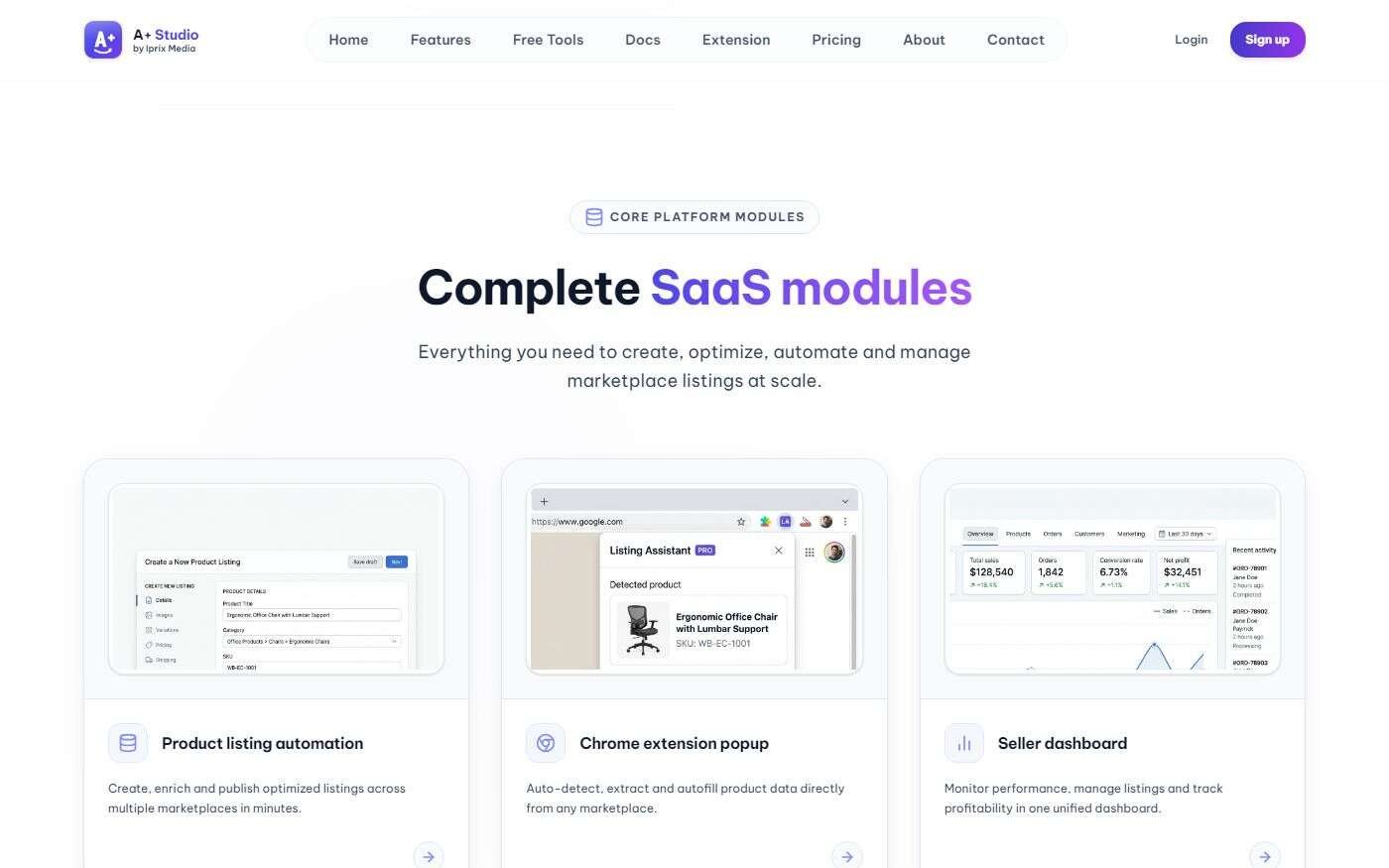
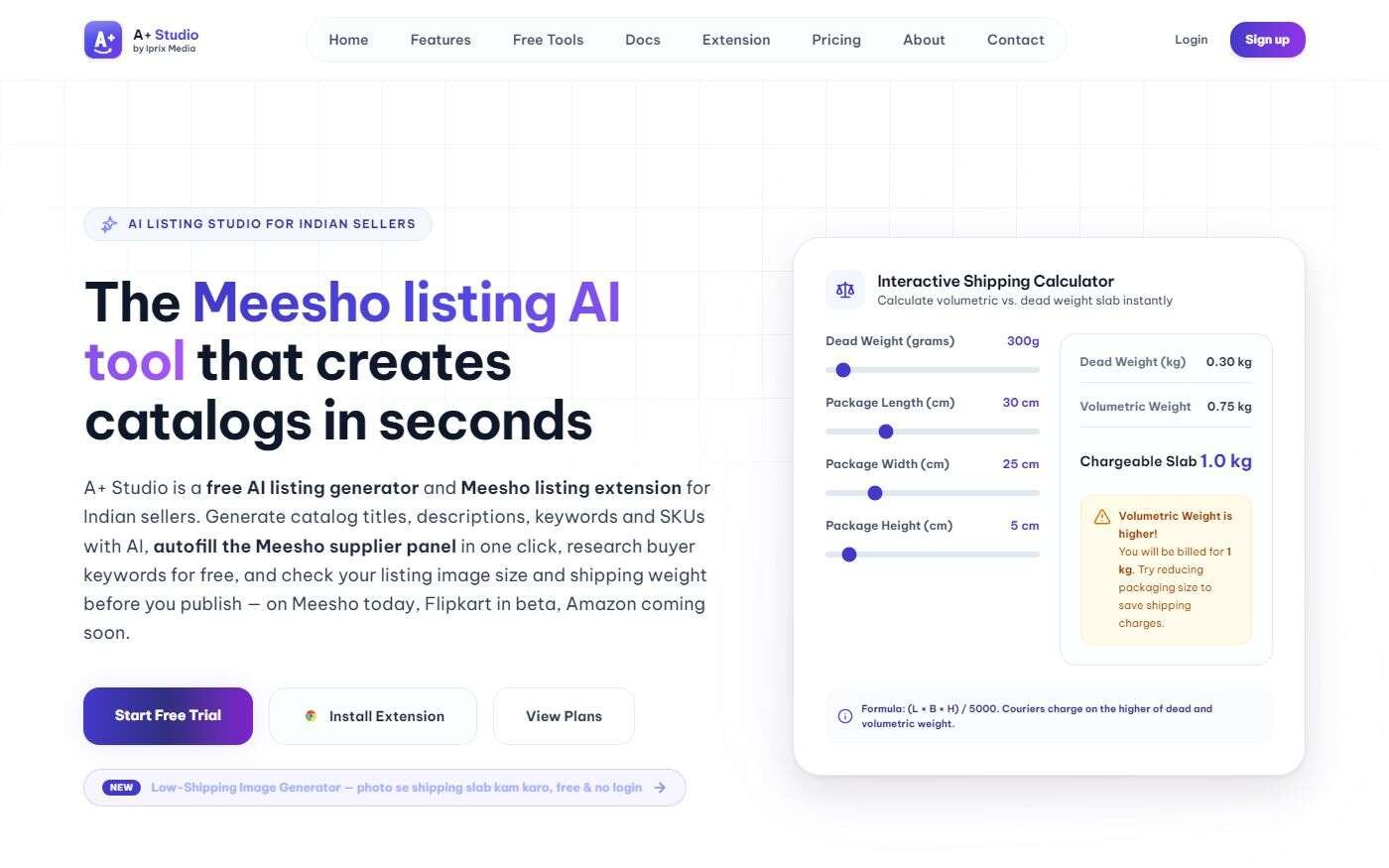
A+ Studio — AI Listing Workspace + Companion Chrome Extension

Sellers generate optimized catalog titles, descriptions, keywords, and SKUs in our SaaS web app, then trigger the A+ Studio Chrome Extension to autofill marketplace supplier forms in one click.

A+ Studio AI listing workspace and Chrome extension preview A+ Studio Chrome extension popup and product listing automation
What We Can Build For You

20 popular extension architectures. We develop custom extensions like these.

From AI writing copilots, screen recorders, and web clippers to CRM sidebars, autofill engines, and DevTools panels — we design and engineer custom browser extensions with capabilities like these global products, tailored to your business workflow.

Build yours with IPrix
How We Build

Our Chrome Extension Development Process

A structured, transparent workflow from initial scoping through security review and store release.

Discovery & Requirement Planning

We identify your target users, browsers, connected platforms, permissions, and exact workflow bottlenecks to define a clear technical scope.

UX Design & Prototyping

We design clickable popups, side panels, settings screens, and in-page overlays that feel fast and unobtrusive.

Development & Integration

We engineer Manifest V3 service workers, content scripts, authentication flows, and secure REST/AI backend integrations.

Testing & Security Review

Every extension undergoes permission audits, DOM compatibility checks, performance profiling, and cross-browser QA.

Deployment & Improvements

We prepare store assets, privacy disclosures, and packages for the Chrome Web Store, Edge Add-ons, Firefox AMO, or private enterprise rollout.

Why Choose Us

Why Work with IPrix Media?

Practical engineering, clear interface design, and full-stack capability when your extension needs more than a popup.

01 · Product Strategy

Product Thinking, Not Just Feature Development

We look at the complete workflow. If a proposed feature adds complexity without delivering meaningful value, we simplify it before development begins.

02 · Full-Stack Architecture

Connected Web Application Capabilities

When your extension needs an admin dashboard, database, billing, or server-side AI processing, our full-stack web engineering team builds the entire connected platform.

03 · Focused Interface

Practical UI/UX Design

A browser extension operates in a compact space. We prioritize clear actions, readable layouts, instant feedback, and zero unnecessary friction.

04 · Tailored Delivery

Scope Built Around Your Requirements

Whether you are a startup launching a SaaS companion extension or an enterprise automating internal operations, we scope around your exact business case.

Explore Your Scope

Have an Extension Idea Worth Building?

Tell us what your extension should do, which websites or applications it needs to work with, and who will use it.

We'll help you explore the development requirements, integrations, practical limitations, and next steps.

Start Your Build

Ready to Turn Your Browser Extension Idea Into a Working Product?

From a simple workflow utility to a connected browser application, the first step is defining the problem clearly.

Talk to IPrix Media about your business requirements, existing technology, and the browser experience you want to create.

FAQ

Questions buyers ask
before they hire us.

The doubts we hear most about our Chrome Extension Development Services, answered plainly. With pricing, Manifest V3 terms, security, and code ownership.

Still deciding?

Ask our Chrome extension developers anything on a free 30-minute call. We tell you honestly if a browser extension is the right fit for your stack.

How much do Chrome Extension Development Services cost, and is the price fixed?

Chrome Extension Development Cost depends on your feature scope, UI complexity, target browsers, and backend or AI integrations. At IPrix Media, our Chrome Extension Development Services come with a transparent, fixed-price proposal and milestone schedule before work begins. If you ask for new features later, we estimate them first for your approval — so there are no surprise invoices.

Are we locked in? Who owns the Chrome extension source code and Web Store listing?

You own 100% of the custom source code, Git repository, Figma design assets, and your Chrome Web Store developer account listing. As a client-first Chrome Extension Development Company, we never lock you into proprietary wrappers or hold your store credentials hostage.

How can I hire Chrome extension developers at IPrix Media, and how fast can we launch?

When you hire Chrome extension developers at IPrix Media, we begin with a rapid technical discovery call to map permissions, target DOMs, and APIs. Focused Manifest V3 browser utilities typically launch in 2 to 4 weeks, while full-stack SaaS companion extensions with OAuth 2.0, AI copilots, and admin dashboards take 4 to 8 weeks.

Custom Architecture, Manifest V3 & Browsers
Can you build a custom Chrome extension for my existing website or SaaS application?

Yes. Our Custom Chrome Extension Development services are frequently used to build companion browser extensions for existing SaaS platforms and web applications. Your extension can share authenticated OAuth 2.0 / JWT sessions, open a persistent Chrome side panel, or inject clean Shadow-DOM controls on target webpages.

Do you provide Manifest V3 Migration Services for older Manifest V2 extensions?

Yes. Through our Manifest V3 Migration Services, we audit your existing Manifest V2 codebase, refactor persistent background pages into event-driven service workers, migrate blocking webRequest calls to declarativeNetRequest, and modernize permissions so your extension stays compliant on the Chrome Web Store.

Can a Chrome extension work without a backend server?

Yes. Lightweight tools built through our Browser Plugin Development Services can operate entirely client-side using Chrome Storage APIs and local state. When your product needs team authentication, Stripe billing, protected API keys, or centralized databases, our full-stack team builds the backend too.

Can one browser extension work across Chrome, Edge, Firefox, and Safari?

Yes. Our Cross-Browser Extension Development approach uses a unified WebExtensions architecture that runs natively across Google Chrome, Microsoft Edge, Brave, Opera, and Vivaldi — with targeted adaptation and QA for Firefox Extension Development (AMO) and Safari Extension Development (macOS/iOS).

What happens after launch if a target website changes its DOM or browser APIs update?

Third-party websites and browser APIs change regularly. Our Chrome Extension Maintenance and Support plans provide rapid DOM selector fixes, store policy compliance updates, security reviews, and continuous feature releases so your business-critical extension stays reliable.

AI Copilots, API Integrations & Store Publishing
Can you integrate OpenAI, Claude, or Gemini into an AI-powered Chrome extension?

Yes. Our AI-Powered Chrome Extension Development team integrates OpenAI (ChatGPT), Anthropic Claude, Google Gemini, and custom RAG pipelines directly into browser side panels and in-page overlays — with secure token routing, streaming responses, and strict data-privacy controls.

Can an extension integrate with our CRM, ERP, or e-commerce marketplace?

Yes. Through Chrome Extension API Integration, we bridge your browser toolbar and active tab with HubSpot, Salesforce, Shopify, Meesho, Jira, Slack, and custom enterprise ERPs using encrypted OAuth 2.0 flows and real-time REST or GraphQL APIs.

Do you handle Chrome Web Store Publishing Services and enterprise private deployment?

Yes. Our Chrome Web Store Publishing Services cover extension packaging, store listing copy, promotional assets, privacy policy disclosures, and least-privilege permission justifications for Google review — plus private enterprise deployment via Google Workspace Admin or Microsoft Edge group policy.

How do we get started with your Chrome Extension Development Agency?

Simply book a free 30-minute discovery call or send us your workflow brief. As an experienced Chrome Extension Development Agency, IPrix Media will evaluate your target websites, browser permissions, and API requirements and provide a clear technical scope and fixed quotation.

About our Chrome extension development services

Everything You Need to Know About Browser Extension Development

IPrix Media builds Chrome extensions in Udaipur for teams that do recurring work in the browser. Your team already spends hours inside a browser. The right extension can make those hours more productive by automating repetitive actions, connecting disconnected platforms, and putting useful information exactly where it is needed. Whether you need a lightweight productivity tool, a customer-facing browser add-on, or an extension connected to your existing web application, we help plan and build solutions around your requirements. From custom interfaces and secure integrations to testing and deployment, we approach each project with usability, performance, and long-term maintainability in mind.

Build Smarter Browser Experiences with IPrix Media

A good browser extension does more than add another button to the toolbar. It solves a problem without making the user learn an entirely new system. As a chrome extension development company, IPrix Media brings together web application development, interface design, and workflow automation to create tools that fit into existing business processes. For a sales team, that could mean displaying useful CRM information while reviewing a prospect's website. For an e-commerce business, it might involve simplifying catalog management. For an internal operations team, it could mean bringing several routine browser actions into one controlled workflow. Our custom chrome extension development approach starts with understanding what users do today, where they lose time, and what can realistically be improved. We believe the most useful technology is often the technology that removes unnecessary steps.

Our Browser Extension Development Services

Custom Chrome Extension Development: Every business works differently. Off-the-shelf extensions may solve a general problem but rarely match a specialized workflow perfectly. We develop custom browser tools with features such as form assistance, contextual information panels, saved templates, workflow shortcuts, and integration with external platforms. Our chrome browser extension development services can support both standalone utilities and extensions that work alongside a larger web application.

Browser Plugin Development Services: Sometimes a full web application is unnecessary. A focused browser plugin can provide the functionality users need without interrupting their work. Our browser plugin development services cover custom interfaces, settings management, browser interactions, and connected workflows. Functionality is selected according to the intended browser environment, available APIs, and required permissions.

AI-Powered Chrome Extension Development: AI becomes useful when it helps someone complete a specific task. Our ai-powered chrome extension development solutions can connect browser interfaces with suitable AI services and assistant interfaces for content assistance, information organization, text processing, and other approved business workflows. We consider response quality, data sensitivity, usage costs, and the amount of control users need before recommending an AI integration.

Cross-Browser Extension Development: Not every customer uses Chrome. Our Cross-Browser Extension Development approach considers how an extension can operate across supported browser environments while accounting for differences in APIs, permissions, interface behavior, and distribution requirements. Where appropriate, a shared codebase can reduce duplicated development work without ignoring browser-specific testing.

Chrome Extension API Integration: A browser extension becomes more valuable when it communicates with tools that employees already use. Through Chrome Extension API Integration, an extension can connect with permitted third-party services, business dashboards, CRM systems, and backend applications. Depending on the project, integrations may involve REST APIs, authenticated endpoints, OAuth authorization, secure data exchange, and user-specific settings.

Chrome Extension Maintenance and Support: A browser extension needs attention after launch, especially when browsers, connected services, or business requirements change. Our Chrome Extension Maintenance and Support services can include issue resolution, compatibility reviews, performance improvements, API adjustments, and planned feature updates. The aim is to keep the extension useful as the surrounding technology evolves.

What Is Chrome Extension Development?

Chrome extension development is the process of building software that adds functionality to the Chrome browser. Unlike a traditional web application, an extension can interact with supported browser features and, with the necessary permissions, provide functionality within or alongside websites. It may appear as a toolbar popup, a side panel, a settings page, or an approved interface within a webpage. A business might use an extension to simplify data entry, display information from another system, manage repeatable tasks, or provide convenient access to an existing SaaS product. A Browser Extension Development Company typically works across interface design, browser APIs, authentication, application architecture, testing, and deployment. Not every idea needs a complicated extension. Some requirements are better served by a web application or a small browser utility. Choosing the right architecture early helps avoid unnecessary functionality and maintenance costs.

How to Choose a Chrome Extension Development Agency

Selecting a Chrome Extension Development Agency involves more than comparing quotations. Start by explaining the business problem and asking how the proposed solution will work. A capable development partner should be able to discuss browser permissions, security implications, data handling, integration dependencies, and extension lifecycle requirements. It is also important to understand what the quotation includes. For example, will the project include interface design, backend development, testing, documentation, and publishing assistance? Who will own the source code? What happens if a connected API changes? A reliable scope should explain the features, deliverables, assumptions, exclusions, and acceptance criteria. Ask for relevant practical work wherever possible. A working extension or demonstrable product architecture is generally more useful than broad claims about technical expertise. Clear communication and realistic technical planning are especially valuable when an extension depends on third-party platforms.

Chrome Extension Development Services for Secure Applications

Security should be considered during architecture and feature planning, not added immediately before release. Modern Chrome extensions use the Manifest V3 platform, which affects background execution, permissions, and other extension capabilities. When building an extension, developers should request only the permissions needed for its functionality. Sensitive information should be handled carefully, and authentication must be designed around the risks of the application. Some projects require access to third-party APIs, while others operate entirely with local settings and browser features. Authentication tokens, external requests, stored data, and communication between extension components all require appropriate consideration. Businesses should also understand that browser store approval is separate from development. An extension must comply with applicable store policies, and approval is not guaranteed. For official requirements, consult the Google Chrome Extensions documentation before finalizing implementation choices.

Manifest V3 Migration Services and Extension Modernization

Extensions developed using older architectures may need technical updates to remain compatible with modern browsers. Manifest V3 Migration Services involve reviewing the current extension, identifying unsupported functionality, and adapting its architecture to applicable requirements. This may include replacing older background-page patterns with extension service workers, updating permissions, revising network request handling, and reviewing dependent libraries. Migration is not always a simple configuration change. Background execution behavior, state handling, and communication between components may require careful redesign. A proper migration process should include an assessment of the existing codebase, a defined change plan, functional testing, and a controlled release. If an extension depends on external services, those integrations should also be checked for continued compatibility.

Chrome Web Store Publishing Services

Building an extension and publishing it are two different stages. Chrome Web Store Publishing Services may involve preparing the extension package, listing information, screenshots, descriptions, privacy disclosures, and related submission materials. Before submission, the extension should be tested against its intended use cases and reviewed for compliance with current store requirements. The listing should clearly explain the extension's purpose and avoid claiming functionality that it does not provide. An accurate privacy policy and transparent permission explanations are particularly important when the extension accesses sensitive information. After submission, the Chrome Web Store reviews the extension. The review timeline and approval decision are controlled by Google. Businesses should therefore allow for potential review feedback or revisions when planning a product launch.

Chrome Extension Development Cost and Project Scope

Chrome Extension Development Cost depends on the functionality, interface complexity, integrations, target browsers, and testing requirements. A basic utility with a popup interface and limited browser interaction will usually require less development effort than a connected business application with authentication, dashboards, multiple APIs, and advanced automation. Cost may also increase when the extension must support multiple browsers, complex third-party websites, team-based access, or a separate backend platform. Before requesting a quotation, prepare a short description of the intended users, essential features, example workflows, and systems that must be connected. It is helpful to separate must-have functionality from features planned for future releases. A phased development approach can make the initial scope easier to validate and help prevent unnecessary development expenditure. For a meaningful estimate, IPrix Media can review the proposed requirements and discuss an appropriate project scope.

Browser Extensions for E-commerce, SaaS and Internal Teams

Browser extensions can be valuable in industries where employees or customers perform repeatable tasks within web platforms. For e-commerce, an extension might help organize product information, simplify approved catalog workflows, or connect marketplace activity with a central dashboard. For SaaS companies, browser functionality can bring existing software features closer to the user's daily work. For sales teams, extensions may provide CRM context, authorized data entry assistance, or convenient shortcuts between connected applications. Marketing and research teams may use approved information collection, note-taking, reporting, or content review workflows. Internal business teams can benefit from specialized browser utilities that reduce unnecessary manual steps. The most suitable solution depends on the websites involved, available APIs, access permissions, data policies, and the amount of user control required.

Got questions? Let’s talk

More revenue from the traffic you already have

Book a 30-minute call. We’ll look at your website and marketing together and tell you what we’d fix first.